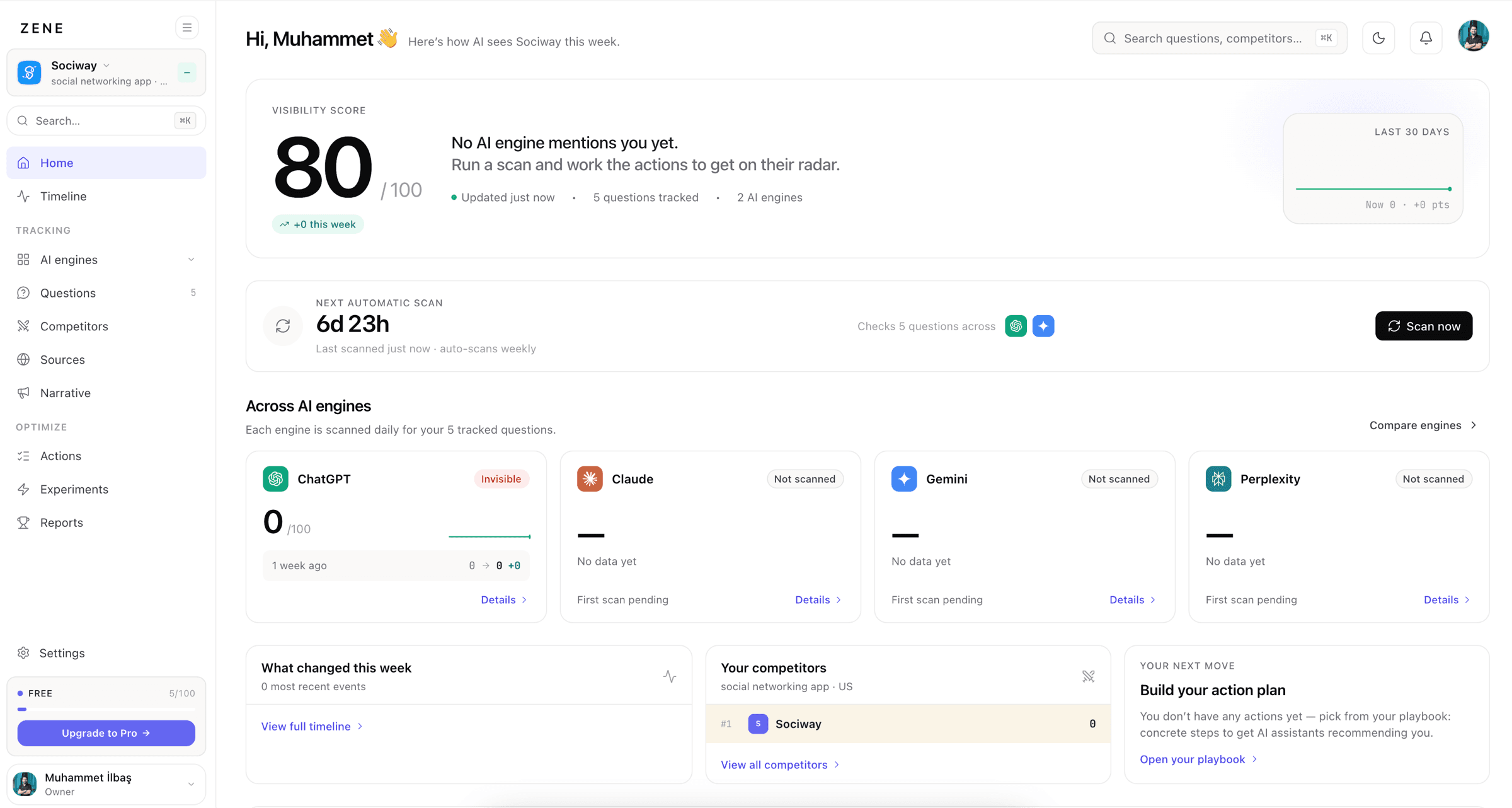
The instinct is to open ChatGPT, type your brand name, see a flattering paragraph, and relax. That's the one check that tells you almost nothing - you primed it with your name, on one engine, in one session, at one moment. Here's how to actually monitor whether AI engines recommend you, set up so it survives contact with how these systems really behave.
Step 1 - Track buyer questions, not your brand name
Your buyers don't type your name into ChatGPT; they describe their problem. So track the questions they actually ask - "best tool for X," "X vs Y," "alternatives to Z," "software for [use case]" - and watch whether you surface unprompted. Asking the engine about you by name measures whether it can describe you; asking the category measures whether it recommends you, which is the thing that matters. Start with ten to twenty real buyer questions, not a hundred vague ones - prompt research is how you find which ones.
Step 2 - Cover the engines your buyers use
Checking only ChatGPT is the most common mistake, because the engines disagree: you can be the default answer in Perplexity and invisible in ChatGPT the same week. Cover the ones your audience actually uses - usually ChatGPT, Google's Gemini and AI Overviews, and Perplexity, plus Claude and Grok for technical or real-time audiences. The point isn't to chase all of them equally; it's to know which one has the gap.
Step 3 - Pick a cadence that matches the drift
AI answers change week to week, so cadence is a real decision, not a detail. Check too rarely and you can't tell a genuine change from a one-off; check obsessively and you'll react to noise. Daily or weekly sampling with a smoothed trend line is the sweet spot - frequent enough to catch a regression within days, smoothed enough that one weird answer doesn't set off a fire drill.
Sample the same questions, the same way, on a schedule. Consistency is what turns a pile of answers into a trend you can trust - an ad-hoc check whenever you remember produces data you can't compare to itself.
Step 4 - Track competitors in the same frame
Your own visibility means little without the field next to it. If you appear in 40% of answers, is that good? Only your competitors' numbers can say. Tracking who else gets named in the same answers gives you share of voice, surfaces the rival who's quietly becoming the default, and tells you which questions are winnable versus locked up.
Step 5 - Watch the sources, not just the answer
When an engine searches, it cites the pages it read - and those citations are an early-warning system. A competitor's new comparison page or a fresh Reddit thread shows up in the sources before it fully reshapes the answer. Logging which domains get cited for your category tells you why an answer is changing, which is what lets you respond to it.
Step 6 - Alert on change; don't stare at a dashboard
The goal isn't to watch this all day - it's to be told when something moves: you dropped out of a key answer, a competitor entered, a description went stale. Set thresholds and let the change find you. A dashboard you have to remember to open is a dashboard you'll stop opening; an alert that fires on a real regression is the one that actually protects the channel.
Be honest about scale. A founder tracking five questions on one engine can absolutely do this by hand in a weekly spreadsheet, and should - it builds intuition for how the answers behave. But the moment it's five engines, a few dozen questions, competitors alongside, drift over time and citations to log, the manual version becomes hours of repetitive sampling that's inconsistent the week you're busy. That's the line where measuring it properly needs an AI visibility tracker - something that runs whether or not you remember to.
If you'd rather skip straight to the running version, Zene sets up exactly this on Pro - buyer questions across every major engine, competitors in the same frame, trended over time. The free audit on ChatGPT and Gemini takes about 90 seconds.
Frequently asked questions
How do I check if ChatGPT mentions my brand?
Ask it the questions your buyers ask - "best tool for X," "alternatives to Y" - rather than your own brand name, and note whether you're named, where, and alongside whom. Do it in a fresh session without priming it with your brand, and repeat over time, because a single check is a snapshot of an answer that drifts.
Can I track my AI visibility manually?
At tiny scale, yes - a handful of questions on one engine, logged in a spreadsheet weekly. It breaks down fast: five engines that disagree, dozens of buyer questions, answers that change week to week, and competitors to track alongside you turn it into hours of repetitive work and inconsistent sampling. That's the point where a tracker earns its place.
Which AI engines should I track?
The ones your buyers actually use - typically ChatGPT, Google's Gemini and AI Overviews, Perplexity, and for technical or real-time audiences Claude and Grok. Because the engines weight sources differently, checking only one gives a false read: you can be the default answer in Perplexity and invisible in ChatGPT at the same time.
 Muhammet İLBAŞ 9 min